

How to Cut Cloud Deployment Time by 60%
Tired of slow cloud deployments? Here’s the fix: AI-driven automation can reduce deployment times by up to 60%.
The problem is clear - manual processes like managing Infrastructure as Code (IaC), handling API limits, and fixing configuration errors waste hours of engineering time. For example, managing 3,000 resources in Terraform can take over 20 minutes just to plan. On top of that, failed deployments can cost over $2,000 in wasted time.
AI tools like Kanu AI change the game by automating the entire deployment process. From defining requirements in plain language to generating code, deploying infrastructure, and validating live systems, AI eliminates bottlenecks and errors.
Key benefits:
- Reduce deployment cycles from 12–24 hours to just 1–3 hours
- Address failures automatically with AI-driven diagnostics
- Improve reliability with 250+ automated checks for security, compliance, and performance
With AI, you can focus on innovation instead of troubleshooting. Let’s dive into how it works.
Finding Bottlenecks in Your Cloud Deployment Process
Problems That Slow Down Deployments
Deployment delays often arise after coding is complete, with key issues including monolithic state files, API rate limiting, and manual review processes. These challenges force platform engineers to spend time on tasks that should ideally be automated.
Monolithic state files are a major hurdle. When Terraform has to manage thousands of resources in a single workspace, it needs to load and refresh all of them while building a dependency graph. This can result in significant delays. For example, teams managing around 3,000 resources in one workspace report plan times exceeding 20 minutes - time spent waiting before deployment even starts.
API throttling is another common problem during large-scale deployments. Cloud providers like AWS, Azure, and GCP impose limits on concurrent API calls, often leading to "429 Rate Exceeded" errors. These errors force retries, introducing further delays. Configuration drift - quick fixes made directly in cloud consoles - only adds to the chaos. These changes create a mismatch between the codebase and the actual environment, leading to unexpected deployment failures.
"The real cost of Terraform mistakes isn't the apply - it's the hours lost across platform, development, and management when things go wrong."
- Carlos Feliciano, CEO, Terracotta AI
The hidden costs of these inefficiencies are staggering. A single failed pull request can waste over 15 engineering hours and cost more than $2,000 in combined platform, developer, and management time. Addressing these bottlenecks starts with identifying them through detailed metrics and logs, setting the stage for AI-driven solutions to optimize deployment workflows.
Using Metrics and Logs to Find Delays
To address delays in your deployment process, you need to measure them first. Tracking core CI/CD metrics like Build Time, Deployment Frequency, Lead Time for Changes, and Mean Time to Recovery (MTTR) can help pinpoint where your pipeline is losing time.
For Infrastructure as Code, the state refresh phase often consumes the most time - sometimes up to 90% of the total plan duration. Running time terraform plan can help you establish a baseline, separating refresh time from actual deployment time. Enabling detailed logging with TF_LOG=TRACE can further reveal which API calls are causing delays.
In Kubernetes deployments, tools like kubectl rollout status and kubectl get events --sort-by='.lastTimestamp' are invaluable for identifying delays. These can help you spot issues like image pull delays, scheduling problems, or probe timeouts. For instance, pulling a 2.1GB image can take up to 1.5 minutes, but optimizing the Dockerfile can significantly reduce this time.
Automating drift detection is another effective strategy. Running read-only plans nightly in your CI/CD pipeline and using the -detailed-exitcode flag can alert you to any environment drift caused by manual changes. This proactive approach helps prevent production failures.
| Metric | What It Measures | How It Reveals Delays |
|---|---|---|
| Build Time | Time from code commit to completed build | Identifies resource bottlenecks or slow test suites |
| State Refresh Time | Time querying cloud provider APIs | Highlights IaC delays from large state files or API limits |
| Image Pull Time | Duration to fetch container images | Flags registry throttling or oversized images |
| MTTR | Time to restore service after failure | Assesses the efficiency of automated rollbacks |
Automating Secure and Scalable AI Deployments on Azure with HashiCorp | ODFP966
Using AI-Powered Tools for Faster Cloud Deployment
Once bottlenecks are identified through key metrics, the next step is to tackle them using AI-powered automation.
Traditional deployment workflows often require engineers to manually write Infrastructure as Code, analyze logs, and coordinate changes across teams - a process that can be both time-consuming and error-prone. AI-driven platforms step in to automate these repetitive tasks, potentially cutting deployment times by up to 60% while also minimizing errors.
Instead of tying up resources in manual coding and debugging, AI tools streamline the entire delivery process. From capturing requirements to validating production, these platforms manage the workflow end-to-end. Kanu AI serves as a great example of this approach, utilizing three specialized agents that work in harmony: the Intent Agent, the DevOps Agent, and the Q/A Agent. Together, they automate deployment from start to finish, reducing delivery times by 80% - a critical step toward achieving the goal of 60% faster deployments. This kind of automation eliminates the need for manual coordination, which often drags out timelines, and lays the groundwork for exploring how Kanu AI transforms deployment workflows.
Defining Deployment Requirements with Kanu AI's Intent Agent
The Intent Agent addresses the common challenge of translating business needs into technical specifications by enabling teams to describe their requirements in plain English.
Rather than jumping straight into generating code, the Intent Agent engages in a conversation to clarify needs and highlight key architectural decisions. For example, if you request "a highly available web app with a database", the agent might ask about your preferred database engine, backup schedules, or multi-region configurations. This back-and-forth ensures that the technical implementation aligns closely with business goals before any actual coding begins.
Once the details are clear, the agent creates an auditable delivery specification - a living document that evolves with changing requirements. This document becomes the single source of truth for deployment, capturing decisions and preferences. Over time, the Intent Agent learns your team's specific standards, such as preferred instance types, naming conventions, or security settings, and applies them to future recommendations.
This approach solves a major pain point: 73% of enterprises struggle with the complexity of manually managing Infrastructure as Code. By focusing on intent rather than syntax, teams can zero in on outcomes while the AI handles the technical intricacies, speeding up requirement definition and reducing misalignment between expectations and execution.
Automating Code Generation and Infrastructure Setup
Once the requirements are set, Kanu AI's DevOps Agent takes over to generate both application and infrastructure code. It produces templates in Terraform, AWS CDK, or CloudFormation, ensuring they adapt to evolving requirements. This automation eliminates the manual coding phase, which can take hours or even days in complex deployments.
The DevOps Agent deploys directly into your existing cloud account, adhering to your established identity, networking, and security protocols. Operating as a single-tenant service within your VPC, it keeps all data within your security boundaries - an essential feature for organizations with strict compliance needs.
Unlike traditional CI/CD workflows, where pull requests are created before validation, Kanu AI integrates with GitHub but only generates a pull request after the system is validated and operational in your environment. The agent handles deployment failures by analyzing logs and metrics, automatically updating the infrastructure code in a "fix-and-retry" loop. This process runs without human intervention, saving time and effort that would otherwise go into manual log analysis and repeated deployment attempts.
| Manual Process | Kanu AI-Powered Process |
|---|---|
| Hand-writing Terraform or YAML files | Automated generation based on natural language |
| Manual deployment and log analysis | AI-driven diagnostics with automatic iteration |
| Hours or days for complex setups | Minutes - with systems delivered up to 80% faster |
| Results vary by engineer skill | Consistent standards through learned team preferences |
The benefits are clear. AI-generated Infrastructure as Code can cut development time by 60–70%, and platforms like Kanu AI reduce configuration errors by as much as 85%. By automating these tasks, teams are freed to focus on building new features and delivering greater value.
sbb-itb-3b7b063
Validating Deployments with AI-Driven Checks
After deploying your systems, it’s crucial to confirm everything is functioning as expected. Traditionally, this meant engineers manually combing through logs, running test scripts, and hoping to catch every issue before it hit production. But let’s face it, this approach is slow, inconsistent, and highly susceptible to human error - especially with today’s intricate cloud setups.
AI-driven validation flips this process on its head. Instead of relying on static templates or pre-deployment checks, AI tools validate live systems, interacting with real endpoints and data paths. This means validation happens on the actual deployed infrastructure, uncovering problems that only appear when everything is up and running. The result? A more reliable way to ensure your deployment is production-ready. Let’s dive into how Kanu AI tackles this challenge head-on.
Running 250+ Automated Validation Checks
Kanu AI's Q/A Agent performs over 250 automated checks to ensure your infrastructure meets security, compliance, and operational standards. These checks cover a wide range of areas:
- Security: Identifying overly permissive IAM roles or exposed network security groups.
- Operational Reliability: Detecting resource dependency cycles and naming conflicts.
- Compliance: Verifying tagging policies and encryption standards.
- Cost Management: Flagging high-SKU resources in non-production environments.
What sets Kanu AI apart is its real-time validation against live systems. For example, it doesn’t just check if an endpoint exists - it ensures the endpoint responds correctly. This level of behavioral validation catches subtle issues, like misconfigured network security groups or resource deadlocks, that manual reviews often overlook.
Here’s a real-world example: Between June and October 2025, an Enterprise SaaS platform managing 35 microservices on AKS adopted an AI-powered DevOps system led by Cloud Architect Divyansh Srivastav. They used LLM-driven agents to analyze 8–15 deployments daily. Within just three weeks, the system flagged 14 critical issues, including misconfigured network settings and resource deadlocks. This effort cut deployment failures by 67% (from 18% to 6%) and slashed the average time to detect issues from 6.5 hours to just 30 seconds.
"AI infrastructure reviews catch issues humans miss - especially in large diffs with subtle configuration errors." - Divyansh Srivastav, DevOps & Cloud Architect
This automated validation not only speeds up deployments - reducing time by 60% - but also ensures that only fully functional code moves forward. And when issues arise, Kanu AI doesn’t just stop at detection; it goes a step further to fix them.
Fixing Errors Through Automated Diagnostics
When something fails, Kanu AI doesn’t leave engineers scrambling. Instead, it dives into logs, metrics, and traces to identify the root cause and automatically adjusts configurations until all checks pass. This eliminates the hours engineers typically spend sifting through log files and correlating data across dashboards.
Here’s how it works: If a validation check fails, the AI enters a fix-and-retry loop. It analyzes the issue, updates the necessary configurations, and redeploys - all without human input. Only after resolving the problem does Kanu AI create a pull request for your review, ensuring you’re looking at a fully validated system, not a work-in-progress.
This approach dramatically reduces incident response times. On average, AI detects issues within 10 minutes, compared to the 45 minutes it takes manually. Considering that 70% of production incidents stem from deployment errors, catching and fixing these problems early significantly boosts system reliability.
| Validation Phase | AI Action | Outcome |
|---|---|---|
| Pre-Deployment | Simulated plan analysis and security scans | Identifies risks like blast radius and IAM permissions |
| Deployment | Real-time monitoring | Detects failures and initiates automated diagnostics |
| Post-Deployment | 250+ validation checks | Confirms compliance and reliability on live systems |
| Iteration | Automated fixes and redeployment | Resolves issues without human intervention |
AI-powered validation is not just faster; it’s more thorough. While manual reviews can take 20 to 40 minutes, AI completes the same process in just 5 to 10 seconds. Plus, with predictive models that identify high-risk deployments with over 80% accuracy, Kanu AI ensures that your deployments meet enterprise-grade reliability standards. With this level of precision, you can confidently move forward, knowing your systems are ready to perform.
Measuring Results: Cutting Deployment Time by 60%
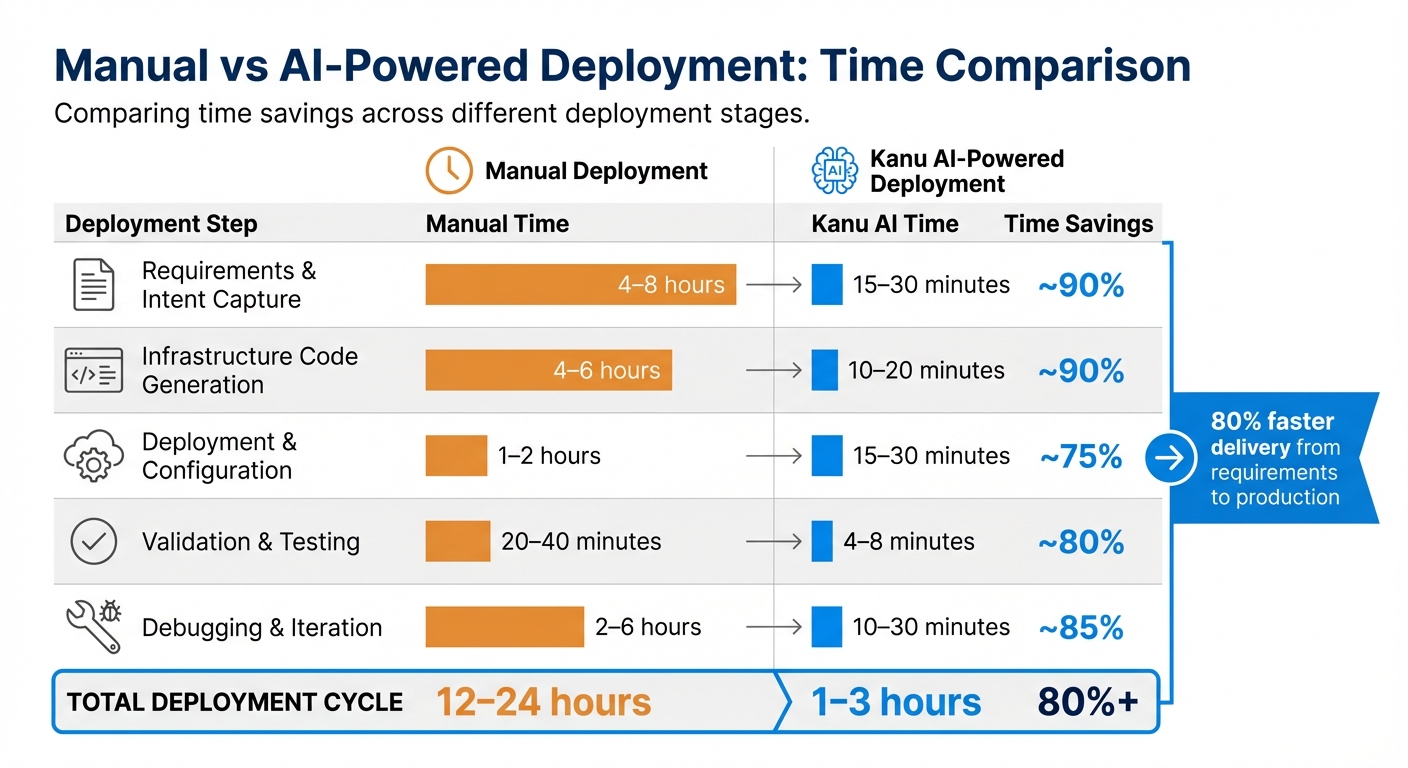
Manual vs AI-Powered Cloud Deployment Time Comparison
Let’s break down the impressive time savings achieved with AI-driven deployments. Kanu AI has revolutionized deployment cycles, cutting the process from days or weeks to mere hours or days. This translates to an 80% faster delivery from requirements to production. The impact is clear: shorter deployment cycles and more efficient workflows.
Manual vs. AI-Powered Deployment: Time Comparison
By automating repetitive tasks at every stage of deployment, Kanu AI delivers significant time savings. Here's a comparison of how much time is saved for each step:
| Deployment Step | Manual Time | Kanu AI Time | Time Savings |
|---|---|---|---|
| Requirements & Intent Capture | 4–8 hours | 15–30 minutes | ~90% |
| Infrastructure Code Generation | 4–6 hours | 10–20 minutes | ~90% |
| Deployment & Configuration | 1–2 hours | 15–30 minutes | ~75% |
| Validation & Testing | 20–40 minutes | 4–8 minutes | ~80% |
| Debugging & Iteration | 2–6 hours | 10–30 minutes | ~85% |
| Total Deployment Cycle | 12–24 hours | 1–3 hours | 80%+ |
These numbers don’t just look good on paper - they’re backed by real-world examples. In February 2026, developer Abhishek Jain demonstrated how deploying a startup MVP - complete with Terraform configuration, Docker setup, and monitoring - took 8 hours manually but only 45 minutes with AI-powered tools. Similarly, in January 2026, Senior DevOps Engineer Prasoongupta automated Terraform commands, saving over 37 hours of manual effort in a month. He also halved the time needed for emergency production fixes, reducing it from 16 minutes to just 8 minutes.
These examples prove that the 60% time reduction isn’t just possible - it’s often a conservative estimate for many workflows. AI-driven tools like Kanu AI are changing the game, making deployment faster and more efficient than ever.
Conclusion
Reducing cloud deployment time is entirely possible with the right automation tools. By analyzing metrics and logs, you can identify areas where manual processes slow things down. This insight allows you to automate the entire delivery cycle - from capturing requirements to live validations.
Kanu AI takes this automation to the next level with its multi-agent system. The Intent Agent identifies and clarifies requirements, the DevOps Agent generates and deploys code, and the Q/A Agent conducts over 250 validation checks to catch errors before production. This approach delivers results - cutting delivery time from requirements to production by 80%. It’s a clear example of how AI can streamline workflows and eliminate inefficiencies. As McKinsey highlights:
"Current generative AI and similar technologies could automate 60–70% of employees' time-consuming tasks - unlocking new levels of productivity".
But it’s not just about speed. Automation also ensures your operations remain secure and compliant. By deploying within your cloud account and maintaining a human-in-the-loop via pull requests, you retain full control while benefiting from faster processes.
Transitioning from manual deployment to AI-driven automation isn’t just about saving time. It’s about creating systems that are faster, more reliable, and easier to manage. With the right strategies and tools, your team can shift its focus from dealing with infrastructure challenges to driving innovation.
FAQs
What should I measure first to find my biggest deployment bottleneck?
To begin, focus on measuring deployment lead time - the time it takes from merging code to having fully operational infrastructure. This will highlight any delays in your workflow. Alongside this, monitor the size and complexity of changes handled by tools such as Terraform. Large diff sizes or resource management challenges can often signal bottlenecks. Tracking these metrics provides clarity on where to focus your efforts for smoother processes.
How does Kanu AI deploy safely inside my existing cloud account and VPC?
Kanu AI integrates directly into your existing cloud account and Virtual Private Cloud (VPC), operating entirely within your infrastructure. This setup ensures that the entire build, deployment, and validation process remains secure, with all data staying within your environment. By deploying resources inside your VPC, it provides an added layer of security and control, eliminating the need for data to traverse the public internet. Additional safeguards, such as IP whitelisting and rigorous security checks, further strengthen the system's isolation and protection.
How do the 250+ live validation checks prevent production incidents?
The system includes over 250 live validation checks that act as a safeguard against production incidents. These checks work by constantly monitoring and verifying infrastructure and code changes before deployment. They are designed to identify and address issues such as misconfigurations, security vulnerabilities, cost overruns, compliance violations, and even naming inconsistencies - all in real time.
This automated safety layer ensures that only thoroughly vetted updates make it to production. By catching errors like open security groups or misconfigured resources early, it helps minimize the risk of outages or security breaches.