

Manual vs Automated Software Validation: Full Breakdown
Choosing between manual and automated software validation boils down to balancing flexibility, speed, and cost. Both methods are essential for ensuring software quality, but they serve different purposes:
- Manual validation is ideal for tasks requiring human judgment, like usability and user experience testing. It’s flexible but slower and harder to scale.
- Automated validation excels at repetitive, high-volume tasks like regression testing and performance checks. It’s faster and scalable but requires a significant upfront investment and maintenance.
Key Takeaways:
- Manual testing is best for uncovering visual glitches, intuitive design issues, and early-stage development testing.
- Automation is perfect for stable, repetitive workflows, such as login processes and cross-browser testing.
- The best approach combines both methods, leveraging automation for speed and consistency while reserving manual testing for areas requiring human insight.
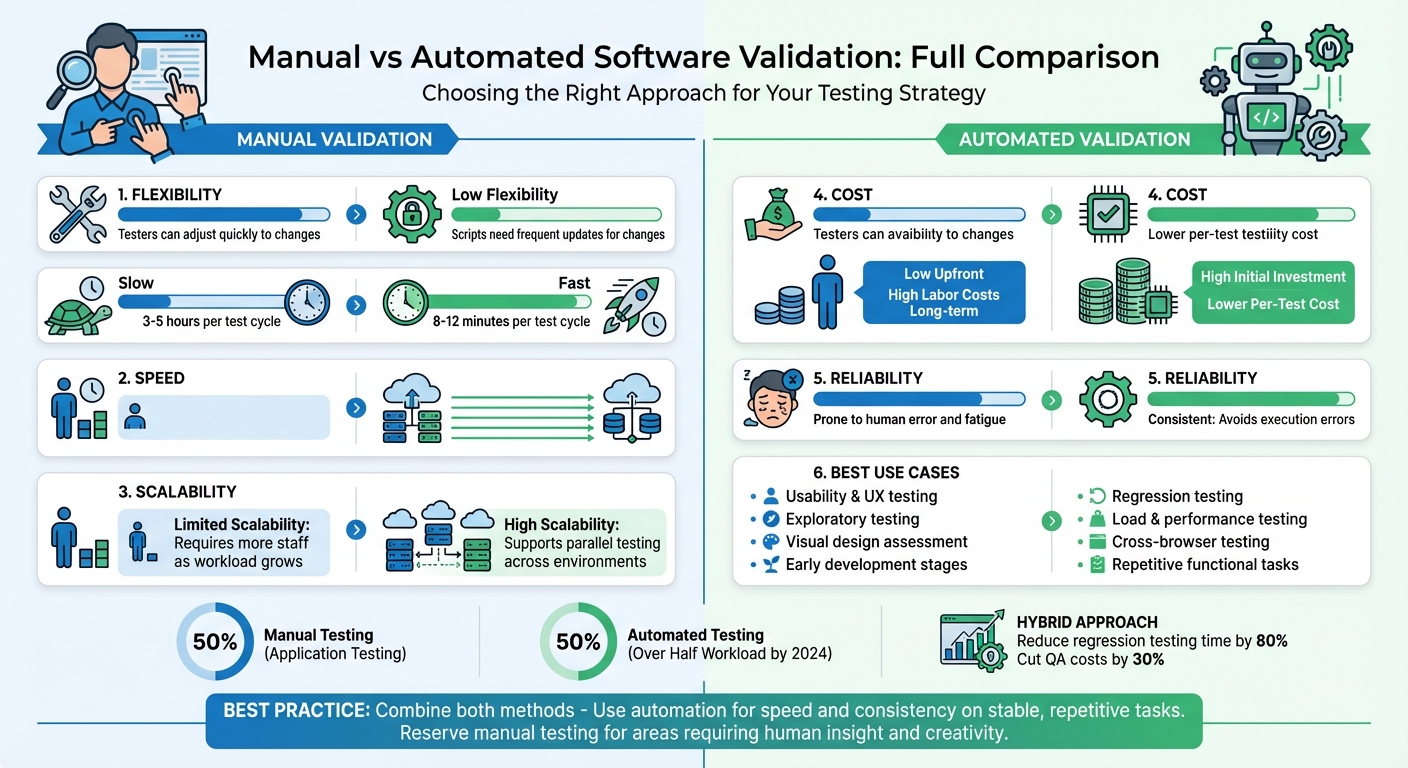
Manual vs Automated Software Validation: Key Differences Comparison Chart
Test Automation Strategies: A Comparison | Serenity Dojo TV

Quick Comparison
| Feature | Manual Validation | Automated Validation |
|---|---|---|
| Flexibility | High; testers can adjust quickly. | Low; scripts need frequent updates. |
| Speed | Slow; reliant on human effort. | Fast; executes tasks at machine speed. |
| Scalability | Limited; requires more staff. | High; supports parallel testing. |
| Cost | Low upfront; labor-intensive long-term. | High upfront; lower per-test cost. |
| Reliability | Prone to human error. | Consistent; avoids execution errors. |
| Best Use Case | Usability, UI, and exploratory testing. | Regression, load, and repetitive tasks. |
Bottom Line: Combine manual testing’s insight with automation’s efficiency for the best results. Start automating stable, repetitive tasks while keeping manual testing for user-focused areas.
1. Manual Software Validation
Manual software validation involves human testers actively interacting with software to simulate real-world user behavior. Testers perform tasks like clicking buttons, filling out forms, navigating menus, and observing how the system responds. This hands-on approach taps into human intuition and creativity, uncovering issues that automated tools might overlook.
Processes
The manual validation process typically includes several steps:
- Requirements Analysis: Understanding what needs to be tested.
- Test Planning: Outlining the scope and objectives.
- Test Case Creation: Developing detailed scenarios for testing.
- Test Environment Setup: Preparing the software and tools for testing.
- Test Execution and Defect Logging: Running tests, documenting issues, and providing evidence like screenshots.
- Regression Verification: Ensuring fixes don’t break existing functionality.
- Documentation: Recording findings for future reference.
This structured process ensures thorough coverage while allowing flexibility for testers to adapt as needed.
Benefits
Manual validation shines in situations where human judgment is indispensable. Testers can spot subtle visual glitches, usability problems, and other user experience issues that automation might miss.
Another advantage is the low initial cost - there’s no need for automation frameworks, CI/CD integration, or specialized programming knowledge. Testers can also pivot quickly during testing to explore unexpected problems, making this method particularly effective in early development stages when features are still evolving.
"Manual testing is the artisanal approach to quality assurance. It's where human testers become detectives, thoroughly examining each detail." - Full Scale
Beyond technical accuracy, manual validation evaluates the "feel" of the software, ensuring navigation is intuitive and the overall user experience meets expectations.
Limitations
Despite its advantages, manual testing has its challenges. One of the biggest drawbacks is time - it’s much slower compared to automated testing. For example, a manual test cycle might take 3–5 hours, while automation can complete the same cycle in just 8–12 minutes.
Human factors like fatigue and error can also affect consistency and reliability. Results may vary between testers, and as software becomes more complex, scaling manual testing becomes increasingly difficult. Additionally, manual testing struggles with scenarios requiring heavy loads or high concurrency, making it less suitable for fast-paced CI/CD pipelines.
Use Cases
Manual validation is ideal when human insight is crucial. For example:
- Exploratory Testing: Testers use intuition to uncover unexpected issues.
- Usability and UI Testing: Human assessment is critical for evaluating visual design and user experience.
- Early Development Stages: When features and requirements are still evolving, manual testing provides flexibility.
- User Acceptance Testing (UAT): Ensures the software meets specific business needs.
- Short-Lifecycle Projects: For quick sprints or MVPs, the cost of setting up automation may not be justified.
sbb-itb-3b7b063
2. Automated Software Validation
Automated validation uses tools like Selenium, Playwright, or Cypress to execute predefined test scenarios, compare results with expected outcomes, and flag any mismatches. This shifts testing from a manual, time-consuming task to a repeatable process that seamlessly fits into modern CI/CD pipelines.
Processes
The process starts with auditing existing test suites to pinpoint stable, frequently executed tests that provide the most value. Teams then define clear automation goals, choose the right tools, and script modular test cases that can be reused across different scenarios. Once set up, the workflow captures baseline states, runs tests, compares results, and flags discrepancies for human review. These automated tests are often embedded into CI/CD pipelines as "merge gates", halting deployments if regressions are detected.
However, automated suites aren’t maintenance-free. As application UIs evolve, test scripts can break due to outdated selectors, requiring regular updates. Flaky tests also need management to ensure reliability. Despite these challenges, this structured approach enhances both the speed and dependability of testing.
Benefits
Automation drastically reduces testing time, completing full regression cycles in just 8–12 minutes compared to the 3–5 hours required for manual testing. It also ensures consistency, executing tests exactly as programmed every time, eliminating the risk of human error or fatigue.
Another major advantage is scalability. Automation tools can run thousands of test cases simultaneously across various browsers, devices, and operating systems - coverage that’s nearly impossible to achieve manually. By 2024, automated tests are expected to handle over half of the testing workload in nearly 50% of software projects. This frees human testers to focus on more engaging activities like exploratory testing and usability assessments.
"Automation isn't about replacing human testers. It's about letting those human testers focus on the interesting problems while computers handle the tedious stuff." – Deboshree Banerjee, Autify
Limitations
Despite its efficiency, automation has its limits, highlighting the importance of a well-rounded validation strategy.
The upfront investment can be steep, covering costs for tools, infrastructure, script creation, and training. Poor software quality costs U.S. businesses roughly $2.41 trillion annually, and fixing defects during testing can be up to 15 times more expensive than addressing them earlier in the design phase.
Automation scripts can also be fragile, breaking when UI elements or dynamic content change, requiring frequent updates. While automation excels at verifying functionality, it falls short in evaluating intuitive user experiences or visual aesthetics. Alarmingly, over 60% of UI bugs in production stem from insufficient visual inspections, and 88% of users are unlikely to return to an app after encountering poor visuals.
Use Cases
Automation shines in repetitive, high-volume testing scenarios, complementing manual methods. Regression testing is a standout example, as automated scripts ensure that existing features continue to function correctly after code changes. Performance and load testing also benefit, with tools that simulate thousands of concurrent users under realistic conditions. Similarly, API validation is enhanced by automation’s ability to execute complex, data-driven scenarios across multiple endpoints quickly.
Cross-browser and cross-device testing becomes much more efficient with automation, as the same test suite can run on browsers like Chrome, Firefox, Safari, and Edge simultaneously. Organizations should focus on automating stable, repetitive, and critical workflows - like login processes, checkout systems, and payment handling - while relying on manual testing for exploratory tasks, new features, and areas requiring human judgment. These use cases highlight automation's strengths and its role in a balanced testing strategy.
Pros and Cons
Deciding between manual and automated testing comes down to weighing factors like flexibility, speed, scalability, cost, and reliability. Each approach has its own strengths and weaknesses, and understanding these trade-offs is crucial for shaping your testing strategy.
Manual testing shines when it comes to adaptability. Testers can quickly respond to changes in the user interface or unexpected edge cases. However, it’s slower and doesn’t scale well, as it relies on human effort. On the other hand, automated testing is fast and scalable, capable of running tests continuously across various environments. But it has its limitations - scripts can be fragile and require updates whenever UI elements change, leading to ongoing maintenance needs.
Cost-wise, manual testing has low upfront expenses but incurs high labor costs over time. Automation, by contrast, demands a significant initial investment and ongoing maintenance, with reports showing maintenance often consumes 80% of the effort compared to just 10% spent on creating new tests. Manual testing can also suffer from human fatigue and inconsistency, while automation delivers consistent results, though it’s not immune to issues like false positives from outdated scripts.
Interestingly, by 2024, over half of organizations had adopted some level of automated testing. Yet, manual testing still accounts for around 50% of application testing, largely because certain tasks - like usability and intuitive assessments - require a human touch.
Here’s a quick comparison of the two methods:
| Feature | Manual Validation | Automated Validation |
|---|---|---|
| Flexibility | High; testers can quickly adjust to changes. | Low; scripts must be updated for changes. |
| Speed | Slow; limited by human execution speed. | Fast; operates continuously at machine speed. |
| Scalability | Hard to scale; needs more staff as workload grows. | High; supports parallel testing across environments. |
| Cost | Low upfront; high labor costs over time. | High initial costs; low per-test execution costs. |
| Reliability | Prone to human errors and fatigue. | Consistent; avoids human execution errors. |
| Best Use Case | Ideal for usability, UX, and exploratory testing. | Best for regression, load, and repetitive functional testing. |
Conclusion
Each validation method comes with its own strengths and challenges, as highlighted in our comparison. Deciding between manual and automated testing isn't about choosing one over the other - it's about understanding how to harness the strengths of both. Manual testing excels at uncovering unexpected issues and ensuring a seamless user experience. Meanwhile, automation shines in maintaining consistency, handling repetitive regression tasks, and scaling across various environments. Amit, Founder and COO at Cyber Infrastructure, sums it up perfectly:
"The question is not 'what is better automated or manual testing,' but 'how do we strategically combine them?'"
The ideal approach lies in blending the two. A hybrid strategy that combines the exploratory and creative insights of manual testing with the speed and reliability of automation can drive impressive results. For instance, such a strategy can reduce regression testing time by up to 80% and cut QA costs by 30% within the first year. Use manual testing for tasks like UX evaluation and exploratory testing, while relying on automation for stable, repetitive checks.
Taking this approach further, AI-driven automation can boost efficiency even more. Features like self-healing scripts adapt to UI changes, failure clustering speeds up debugging by grouping similar issues, and predictive analysis helps prioritize high-risk tests - all of which reduce ongoing maintenance efforts.
To get started, focus on automating stable and repetitive test cases, such as login processes, payment workflows, and essential user paths, to maximize ROI. Reserve manual testing for areas that require human intuition, like accessibility, visual aesthetics, and emotional user interactions. Ultimately, the goal isn't just faster or cheaper testing - it's delivering dependable software that users can count on.
FAQs
What should I automate first?
When it comes to automation, start with areas that are repetitive, time-consuming, and central to your application - like login flows or core functionalities. These are perfect candidates for regression testing and can deliver quick, actionable feedback, particularly in CI/CD pipelines. Automation shines in tasks that need to be repeated often and demand high efficiency.
That said, not everything should be automated. Manual testing remains crucial for exploratory testing, usability checks, and edge-case scenarios where human intuition and judgment are irreplaceable. Balancing both approaches ensures better coverage and smarter resource use.
When is manual validation still necessary?
Manual validation becomes crucial when tasks demand human judgment. This applies to things like usability testing, exploratory testing, and evaluating early-stage features. These scenarios rely heavily on intuition and experience - qualities that automated tools simply can't replicate. Human insight brings a level of depth and adaptability that's essential for assessing aspects that go beyond what machines can analyze.
How do I reduce flaky automated tests?
Reducing flaky automated tests involves a mix of proactive strategies and smart tools. One effective approach is to implement self-healing mechanisms that can adjust to minor changes in the application. Tools with self-healing capabilities can automatically identify and recover from flaky conditions, minimizing disruptions.
It's also essential to regularly review and maintain test scripts. This helps identify and fix unstable cases before they become a bigger issue. On top of that, leveraging AI-driven validation frameworks can boost stability. These frameworks adapt dynamically to UI changes, helping to reduce false positives and improve overall reliability.